hgjhg

Progeasy : technology news - Computer lessons - security - computer hardware

technology news - Computer lessons - security - computer hardware by progeasy.blogspot.com.

McAfee invented DRM photos posted on Facebook

Which was presented to us as a "condom for your social life" allows you to prohibit your friends to download your photos published. The screen printing is disabled, but we have no details on the exact functioning of this solution.

iPad mini: delivery times lengthen

Opened last Friday iPad preorders have mini seems it really started. Evidenced by the delivery which have been in a few hours from the original date of November 2 to 2 weeks.

VIZIO announced of Windows 8

PC newcomer Vizio has announced their Windows 8 holiday lineup consisting of two all-in-one desktops, two Ultrabooks and a single notebook.

A new generation of remote control helicopter

Enthusiasts gear remote controlled, you ever imagined you spend eternal joysticks with various buttons that never end? Here Chorus Helicopter Remote Control will transport you to another universe.

LAST NEWS

Friday, July 5, 2013

how to Turn Off Automatic Updates in Windows 7

how to Turn Off  Automatic Updates in Windows 7
Although this is not recommended, you can disable automatic updates in Windows Update. With this trick, you will be able to disable the downloading and installation of security updates your Windows 7.

To disable automatic updates in Windows 7.
  • Click on the Start menu icon
  • Open the Control Panel
  • Click on ‘Windows Update’ as shown below.
Windows Update
  •  Click on the ‘Change settings’ option on the left side of the window.
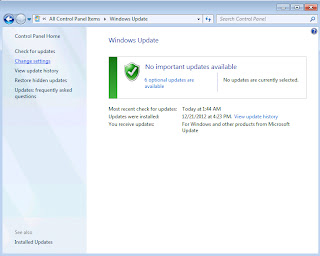
how to Turn Off  Automatic Updates in Windows 7  Change settings

  • Now, you can change any settings for how Windows applies updates to your computer. To disable automatic updates, click on the first drop down box, and choose an option other than ‘Install updates automatically’. If you are going to turn off automatic Windows updates, I’d recommend choosing the option to ‘Check for updates but let me choose whether to download and install them’.
how to Turn Off  Automatic Updates in Windows 7
  • Click on ‘OK’ to save your settings.
Now that you’ve saved this setting, automatic updates will be disabled from now on. Since you will no longer be getting updates automatically, it’s important to make sure you periodically check for updates on your own, and make sure you install them as needed.
Keeping your computer up to date with the Windows updates will help to make sure that your computer is always running at it’s best, and any errors, bugs, or security holes get patched up.

Wednesday, July 3, 2013

Credit Cards: Fraud up slightly

Credit Cards: Fraud up slightly
The rate of payment fraud and credit card withdrawals increased slightly in France in 2012, said Tuesday the governor of the Bank of France Christian Noyer.In 2012, the fraud rate reached 0.080% of the amount of transactions, or € 450.7 million, against 0.077% in 2011. This rate is up for the fifth consecutive year, according to the Observatory for Payment Card Security, which released its report Tuesday.

This is mainly attributable to a significant increase in fraud at international level (11.2%) due to an increase in card theft and piracy data when traveling abroad but also to an increase in fraud on foreign websites (37%).


Noyer nevertheless welcomed the decline in the rate of payment fraud on the internet in France 'for the first time since 2008', to 0.290% against 0.341% of payments in 2011.


Rise of safety devicesThis is explained by the rise of safety devices for authentication of cardholders, which now represent 27.5% of the transactions in value against 23% in 2011.


These type devices '3 D Secure 'baptized' Verified by Visa 'and' MasterCard Secure Code 'in the two largest credit card, require an additional step when paying with the entry of a code received by SMS or Intelligence birth date.


However, the nominal amount of internet fraud has continued to grow last year and still represents 61% of total fraud.


'This is why I call on all stakeholders, including online merchants most vulnerable to fraud, to continue in 2013 actions to help secure online payments', urged the Governor of the Bank of France Christian Noyer, also president of the Observatory, at a press conference.


In addition, 'the shifting of fraud to international transactions clearly shows that the fight against fraud can not stop at the national level', said Mr Noyer.


A European forum 'Secure Pay', which brings together central bankers and supervisors, was created in this way, to coordinate prevention activities.

Monday, June 24, 2013

The giant smartphone Samsung Galaxy Mega 6.3


The giant smartphone Samsung Galaxy Mega 6.3
The Galaxy Mega is between the smartphone and the tablet and wishes to bring portability and finesse of a smartphone with the power, multitasking ability and comfort of a tablet. With its large 6.3-inch HD screen, the Galaxy Mega is ideal for multimedia use such as web browsing, watching videos, or social networks.The Galaxy Mega 6.3 runs on Android 4.2 Jelly Bean and is equipped with a dual-core 1.7GHz processor, a comfortable internal storage capacity (8GB or 16GB) and an expandable memory of 64 GB to store applications , music, videos or photos. The 3200 mAh battery can enjoy talk time and multimedia longer use.The terminal is also equipped with an 8 megapixel camera and a front camera that offers many modes as Sound & Shot (9 seconds to capture her when the picture is taken), Drama Shot (merges multiple exposures on a photo to see a movement), Eraser (to delete unwanted part of the photo), Panorama, Sports, and many others.Air View function allows passing his finger on an email, an event S Planner, image gallery or video to preview the contents without opening the file. The Galaxy Mega also offers multitasking like sharing screen that allows you to use two applications simultaneously or Pop up video window that reduces the video to continue to look while using other features of the phone.The Samsung Galaxy Mega also incorporates many features to stay connected permanently with his entourage:• "Group Play" allows you to connect up to 8 devices.• "Samsung WatchON" transforms the Galaxy Mega infrared remote control for TV box, DVD player and even air conditioning. It also provides the program schedule and recommendations.• "Samsung Link" to easily share photos, videos, notes or music with a TV, tablet or computer.• "S Translator": the user can say or write what he wants, the Galaxy Mega to provide instant translation, written or voice. Works for many applications such as e-mail, sms or messages ChatON.• "ChatON" instant messaging system that allows you to communicate and share everything we have on the screen with his friends.